![image001-4.png]](https://answers.gomainspring.com/hs-fs/hubfs/image001-4.png?height=40&name=image001-4.png)
## Symptom:
* Every time I press the "Send to FormPro" button after editing Customer data in a PDF, my browser opens up with a message similar to this:
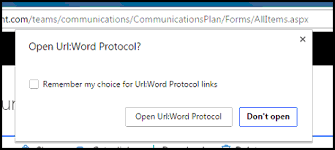
* Or I do not have the "Remember my choice" option in that dialog.
## Cause:
Google Chrome and other browsers have security settings that prevent the default fmp:// URL (filemaker's URL handler) from being saved.
## Remedy:
Two windows registry keys can override the default settings to ensure that fmp:// URLs are handled properly, and the checkbox "Remember my choice" is shown. Once these registry keys are updated, the next time the "Send to FormPro" button is pressed, the user can check the box to remember their setting so that it is automatically opened in the future.
If you are unfamiliar with installing the registry key files below, please contact MainSpring for support.
## Support Files:
Registry Key 1: [Enable fmp:// URI protocol](http://formpro.gomainspring.com.s3.amazonaws.com/supportfiles/fmpRegKey.reg)
Registry Key 2: [Enable "Remember my Choice" checkbox](http://formpro.gomainspring.com.s3.amazonaws.com/supportfiles/ShowExternalProtocolWarningBypassCheckbox.reg)
* Every time I press the "Send to FormPro" button after editing Customer data in a PDF, my browser opens up with a message similar to this:
* Or I do not have the "Remember my choice" option in that dialog.
## Cause:
Google Chrome and other browsers have security settings that prevent the default fmp:// URL (filemaker's URL handler) from being saved.
## Remedy:
Two windows registry keys can override the default settings to ensure that fmp:// URLs are handled properly, and the checkbox "Remember my choice" is shown. Once these registry keys are updated, the next time the "Send to FormPro" button is pressed, the user can check the box to remember their setting so that it is automatically opened in the future.
If you are unfamiliar with installing the registry key files below, please contact MainSpring for support.
## Support Files:
Registry Key 1: [Enable fmp:// URI protocol](http://formpro.gomainspring.com.s3.amazonaws.com/supportfiles/fmpRegKey.reg)
Registry Key 2: [Enable "Remember my Choice" checkbox](http://formpro.gomainspring.com.s3.amazonaws.com/supportfiles/ShowExternalProtocolWarningBypassCheckbox.reg)